
Hosting, WordPress, Themes, and Pagebuilders
A Complete Beginner's Guide to Hosting, WordPress, and Themes
If you've ever wanted to create a website but felt overwhelmed by terms like "hosting," "WordPress," "themes," and "page builders," you're not alone. Let me break down everything you need to know in plain English.

What is Website Hosting?
Think of website hosting like renting space for your house. Just as your physical home needs land to sit on, your website needs a place to live on the internet. That place is called a server—basically a specialized computer that runs 24/7 and makes your website accessible to anyone in the world.
When you pay for hosting, you're renting space on one of these servers. Companies like WHC, Bluehost, or HostGator own massive buildings full of these servers and rent out portions to people like you. Your hosting plan determines how much space you get, how fast your site loads, and how much traffic it can handle. I prefer WHC since it is from Montreal, and always gives good service when needed.
Without hosting, your website simply doesn't exist online. It's that essential.
What is WordPress?
WordPress is the software that actually builds and manages your website. If hosting is the land your house sits on, WordPress is the construction framework that lets you build the house itself.
Here's what makes WordPress special: it's free, incredibly popular (powering over 40% of all websites), and designed so that people without coding knowledge can create professional websites. Instead of writing complex code, you work with a visual dashboard where you can add pages, write content, upload images, and customize your site's appearance with just clicks.
There are actually two versions of WordPress that confuse beginners. WordPress.org is the free software you install on your own hosting (this is what most people use and what we're discussing here). WordPress.com is a separate hosting service that uses WordPress software but limits what you can do unless you pay for premium plans.
What are Themes?
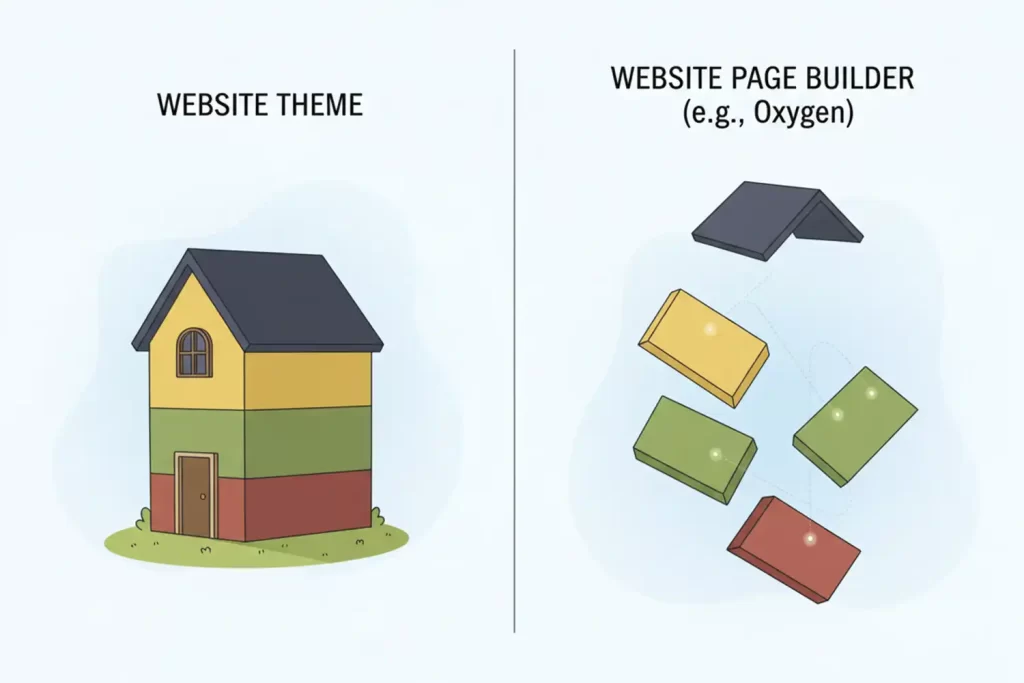
A theme controls how your website looks—the colors, fonts, layout, and overall design. Think of it like choosing between a modern minimalist house, a cozy cottage, or a sleek apartment. The structure is still a house, but the style is completely different.
WordPress has thousands of themes available, both free and paid. Some are designed for blogs, others for online stores, portfolios, business websites, or restaurants. You can preview themes, install them with one click, and switch between them whenever you want. Your content stays the same; only the appearance changes.
Many themes come with customization options that let you change colors, upload your logo, adjust layouts, and modify fonts without touching any code.
What are Page Builders?
Page builders take website creation one step further by giving you drag-and-drop control over your site's design. Popular ones include Elementor, Divi, and Beaver Builder.
Imagine arranging furniture in your home by literally dragging pieces where you want them. That's what page builders do for your website. You can drag text boxes, images, buttons, contact forms, and other elements onto a page and arrange them exactly how you envision. You see your changes in real-time as you build.
Without a page builder, you're somewhat limited by your theme's pre-set layouts. With a page builder, you have creative freedom to design unique pages that match your exact vision.
Personally, I work with Oxygen and Bricks builders, which are particularly powerful options for those who want their websites to perform exceptionally well in search engines. These builders are different from the more popular options because they're built with clean, lightweight code that Google loves.
Why Oxygen and Bricks Are Better for SEO and AEO, and what are they?
SEO (Search Engine Optimization)
It is about making your website easy for Google to find, understand, and rank.
AEO (Answer Engine Optimization)
The newer evolution focused on how AI systems and voice assistants find and present information from your site.
Here's why Oxygen and Bricks excel at both:
Cleaner Code: Unlike some page builders that add lots of extra code (called "bloat"), Oxygen and Bricks generate minimal, clean code. This means your pages load faster, and Google ranks faster websites higher in search results.
Better Performance: Speed matters tremendously. Google has confirmed that page speed is a ranking factor, and users abandon slow websites. Oxygen and Bricks create websites that load significantly faster than those built with heavier builders, giving you a competitive advantage.
More Control Over Structure: These builders give you precise control over your HTML structure, making it easier to implement proper heading hierarchies, schema markup, and semantic HTML—all things that help Google understand what your content is about.
AEO-Friendly: As AI assistants like ChatGPT, Alexa, and Google Assistant become more common, they need to extract clear, well-structured information from websites. The clean code and proper structure that Oxygen and Bricks create make it easier for these AI systems to understand and reference your content.
The tradeoff is that Oxygen and Bricks have a steeper learning curve than beginner-friendly options like Elementor, but for those serious about website performance and search visibility, they're worth the investment in learning.
How It All Works Together
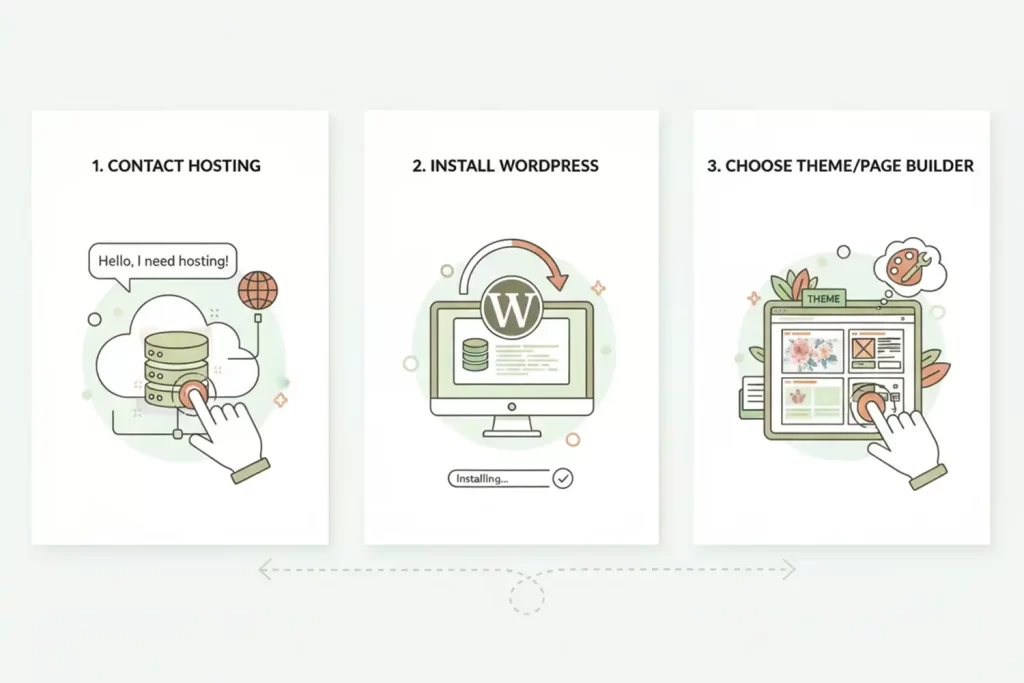
Here's the complete picture: You purchase hosting from a hosting company, which gives your website a home on the internet. You install WordPress on that hosting (most hosts offer one-click WordPress installation). You then choose and activate a theme to give your site its look. If you want more design control, you can add a page builder plugin to customize individual pages.
The beautiful thing is that you don't need to understand all the technical details to get started. Most hosting companies walk you through the initial setup, WordPress guides you through the basics, and themes often include demo content you can customize to make your own.
Getting Started
For most beginners, I'd recommend this path: choose a reputable hosting company with good customer support, install WordPress through their dashboard, pick a simple free theme to start, and focus on creating content. As you get comfortable, you can experiment with premium themes or page builders to expand what's possible.
The most important thing to remember is that everyone who runs a website started exactly where you are now. Take it one step at a time, and before you know it, you'll have your own corner of the internet.